Kanban Board Software: Complete Workflow & Task Management Solution for Modern Businesses
Managing multiple projects, employee tasks, customer requests, and operational workflows can become difficult without a structured system. Therefore, businesses are increasingly adopting Kanban Board Software to improve workflow visibility, streamline operations, and increase team productivity.
A Kanban Board provides a visual workflow management system that helps teams organize tasks, monitor progress, and complete projects efficiently. As a result, businesses can reduce delays, improve collaboration, and optimize resource management.
At GreenITCo Pvt Ltd, we provide intelligent workflow management and task tracking solutions designed to help organizations automate operations and improve business efficiency.
What is a Kanban Board?
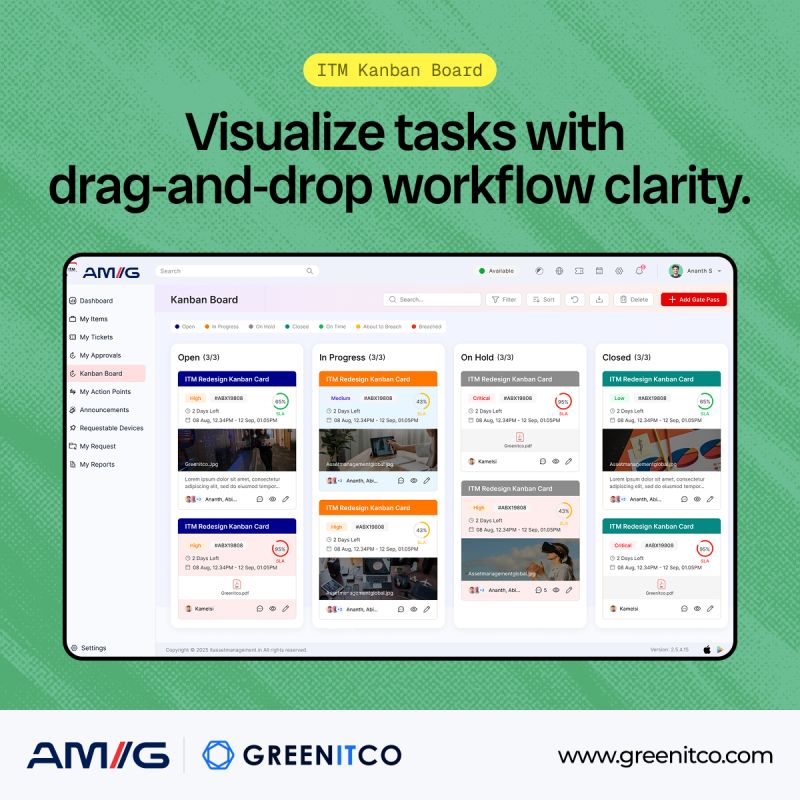
A Kanban Board is a visual task and workflow management system that helps businesses track work progress in real time. Originally developed for manufacturing processes, Kanban methodology is now widely used in IT, customer support, project management, HR, and enterprise operations.
In simple terms, a Kanban Board divides tasks into different workflow stages. Consequently, teams can clearly understand which tasks are pending, ongoing, or completed.
Common Workflow Stages in a Kanban Board
To Do
This section contains all pending tasks that need to be started.
In Progress
Tasks currently being worked on are moved to this stage.
Review or Testing
Completed work is reviewed before final approval.
Completed
Finished tasks are moved to the final stage for tracking and reporting purposes.
Because of this structured approach, businesses can improve task transparency and operational control.
Why Businesses Need Kanban Board Software
Modern businesses handle hundreds of tasks daily. However, traditional spreadsheets and manual tracking systems often create confusion, communication gaps, and workflow delays.
Therefore, companies are adopting Kanban Board Software to simplify workflow management and improve operational productivity.
Benefits of Kanban Board Software
Improved Workflow Visibility
One of the biggest advantages of a Kanban Board is complete workflow transparency. Every team member can easily see task status, priorities, and pending activities.
As a result, project tracking becomes easier and more organized.
Better Team Collaboration
A centralized workflow system allows employees to communicate, update tasks, share files, and collaborate efficiently.
Moreover, it reduces unnecessary meetings and email communication.
Faster Task Completion
Since managers can identify bottlenecks quickly, teams can resolve issues faster and improve project delivery timelines.
Consequently, organizations achieve better operational efficiency.
Increased Productivity
Kanban systems help employees focus on priority tasks while minimizing distractions.
Therefore, teams spend more time completing work instead of managing it manually.
Real-Time Task Tracking
Managers can monitor workflow progress, employee performance, and task completion status instantly.
Additionally, real-time reporting improves decision-making and workload distribution.
Key Features of Kanban Board Software
An advanced Kanban Board Software includes several intelligent workflow management features that simplify business operations.
Drag-and-Drop Task Management
Employees can easily move tasks between workflow stages using a simple drag-and-drop interface.
Therefore, task updates become faster and more user-friendly.
Task Assignment and Ownership
Managers can assign tasks to specific employees with deadlines and priority levels.
As a result, accountability and responsibility improve significantly.
Workflow Automation
Automation features reduce manual work by automatically updating task statuses, notifications, and approvals.
Consequently, businesses save time and improve efficiency.
Real-Time Notifications
Employees receive instant alerts about task updates, comments, deadlines, and workflow changes.
Thus, communication becomes faster and more effective.
File Sharing and Collaboration
Teams can upload documents, screenshots, and files directly inside tasks.
Because of this, project-related information remains centralized and easily accessible.
Reporting and Analytics Dashboard
Kanban systems provide performance insights through reports and dashboards.
Therefore, managers can analyze productivity, workload, and workflow performance more effectively.
Cloud-Based Accessibility
Cloud-enabled Kanban solutions allow employees to access tasks remotely from any device.
As a result, businesses can support hybrid and remote work environments efficiently.
How Kanban Board Software Improves Workflow Management
A digital Kanban Board System helps organizations optimize workflows by improving visibility, communication, and task management.
Better Project Planning
Managers can organize projects into smaller tasks and assign responsibilities clearly.
Therefore, project execution becomes smoother and more efficient.
Reduced Workflow Bottlenecks
Visual workflow tracking helps identify delays and pending approvals quickly.
Consequently, businesses can resolve operational issues before they affect productivity.
Enhanced Employee Accountability
Since every task is assigned to a responsible employee, ownership improves naturally.
As a result, teams become more disciplined and organized.
Improved Resource Management
Managers can monitor employee workloads and distribute tasks more effectively.
Thus, organizations can prevent overloading and underutilization of resources.
Industries Using Kanban Board Software
Today, Kanban systems are used across multiple industries because of their flexibility and workflow optimization capabilities.
IT and Software Development
Software companies use Kanban Boards for:
Bug Tracking
Track software issues and development errors efficiently.
Sprint Management
Manage agile workflows and development cycles.
Deployment Monitoring
Monitor testing, approvals, and software deployment stages.
Customer Support and Service Desk
Support teams use Kanban Boards to manage:
Incident Requests
Track customer complaints and issue resolution.
Service Tickets
Organize support requests based on priority and status.
IT Help Desk Operations
Improve response times and customer satisfaction.
Human Resource Management
HR departments use Kanban systems for:
Recruitment Tracking
Monitor interview processes and candidate status.
Employee Onboarding
Track training, documentation, and onboarding activities.
Internal HR Tasks
Manage employee requests and workflow approvals.
Marketing and Creative Teams
Marketing agencies use Kanban Boards for:
Campaign Management
Track marketing activities and campaign progress.
Content Approval Workflow
Manage blog writing, design approvals, and publishing schedules.
Social Media Planning
Organize posts, creatives, and publishing timelines.
Kanban Board vs Traditional Task Management
| Feature | Traditional Management | Kanban Board Software |
|---|---|---|
| Workflow Visibility | Limited | High |
| Task Tracking | Manual | Real-Time |
| Team Collaboration | Moderate | Advanced |
| Reporting | Basic | Detailed Analytics |
| Workflow Automation | Not Available | Available |
| Remote Accessibility | Limited | Cloud-Based |
Therefore, businesses using Kanban Board Software experience improved efficiency, better collaboration, and faster project completion.
Why Digital Kanban Boards Are Better Than Manual Systems
Traditional methods such as spreadsheets, whiteboards, and emails are difficult to manage for growing organizations.
However, digital Kanban Board Software provides several advantages.
Centralized Workflow Management
All project information remains available in one secure platform.
Better Communication
Teams can collaborate inside the system without relying heavily on emails.
Workflow Automation
Automation reduces repetitive manual tasks and improves operational speed.
Secure Data Management
Cloud-based systems provide secure access control and backup features.
Scalability
Businesses can easily expand workflows and teams without operational disruption.
How GreenITCo Helps Businesses Improve Workflow Management
GreenITCo Pvt Ltd offers customized workflow management and task automation solutions for businesses of all sizes.
Our solutions help organizations:
Improve Task Management
Track employee activities and operational workflows efficiently.
Streamline IT Service Desk Operations
Manage incidents, support tickets, and customer requests effectively.
Increase Team Productivity
Automate repetitive workflows and improve collaboration.
Enhance Workflow Transparency
Monitor project progress in real time with detailed reporting.
Support Remote Work Environments
Enable secure cloud-based workflow access from anywhere.
Because of our scalable and user-friendly solutions, businesses can improve operational efficiency and simplify workflow management.
Best Practices for Using Kanban Board Software
To maximize the benefits of a Kanban Board, businesses should follow workflow management best practices.
Keep Workflows Simple
Avoid unnecessary complexity and create clear workflow stages.
Limit Work in Progress (WIP)
Reducing excessive ongoing tasks helps teams focus better.
Update Tasks Regularly
Real-time task updates improve visibility and communication.
Prioritize Tasks Properly
Clearly defined priorities help teams focus on important work first.
Review Workflow Performance Frequently
Regular analysis helps identify bottlenecks and improve efficiency.
Future of Kanban Board Software
As businesses continue adopting digital transformation strategies, Kanban systems are evolving rapidly.
Future workflow management solutions will include:
AI-Powered Workflow Automation
Artificial intelligence will automate repetitive operational tasks.
Predictive Analytics
Advanced reporting tools will predict workflow delays and productivity trends.
Smart Resource Allocation
Systems will automatically distribute workloads based on employee capacity.
Integration with ITSM Platforms
Kanban Boards will integrate seamlessly with service desk and IT asset management systems.
Mobile-First Workflow Management
Employees will manage workflows more efficiently through mobile applications.
Therefore, businesses investing in modern workflow systems today will gain long-term operational advantages.
Conclusion
A Kanban Board Software solution is one of the most effective tools for workflow management, task tracking, and productivity improvement. It helps businesses improve collaboration, streamline operations, reduce workflow bottlenecks, and manage projects more efficiently.
Whether you are managing IT operations, customer support, HR workflows, or enterprise projects, implementing a Kanban system can significantly improve operational performance.
If your organization is looking for a smart and scalable workflow management solution, GreenITCo Pvt Ltd can help you implement customized Kanban-based systems designed for your business needs.
Frequently Asked Questions (FAQs)
What is a Kanban Board?
A Kanban Board is a visual workflow management system used to organize tasks, monitor progress, and improve operational productivity.
What are the benefits of Kanban Board Software?
It improves workflow visibility, collaboration, task tracking, reporting, and overall business efficiency.
Is Kanban Board Software suitable for small businesses?
Yes, Kanban systems are highly scalable and suitable for startups, SMEs, and enterprise organizations.
Can Kanban Boards improve team productivity?
Yes, Kanban Boards help employees focus on priorities, reduce workflow confusion, and improve collaboration.
Does GreenITCo provide workflow management solutions?
Yes, GreenITCo Pvt Ltd provides customized workflow automation and task management solutions for businesses..